













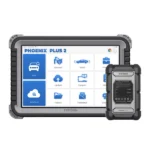
Phoenix XLink Professional Automotive OBD2 Diagnostic Scanner
Original price was: $1,130.90.$698.99Current price is: $698.99.

Phoenix XLink Professional Automotive OBD2 Diagnostic Scanner
The Phoenix XLink Professional Automotive OBD2 Diagnostic Scanner helps technicians diagnose vehicle faults and perform advanced repair tasks. It features a 10.1-inch touchscreen, full-system diagnostics, and cloud-based ECU programming. Moreover, its professional diagnostic functions support modern automotive repair workshops.
This professional automotive OBD2 scanner offers 41 maintenance functions, bidirectional testing, and vehicle topology mapping. It also supports CAN-FD and DoIP communication protocols. As a result, technicians can inspect electronic systems and troubleshoot compatible vehicles efficiently.
Key Features of Phoenix XLink
- 10.1-Inch Touchscreen: Displays diagnostic information and vehicle data clearly.
- Full-System Diagnostics: Scans supported vehicle electronic systems.
- 41 Maintenance Functions: Provides routine service resets and maintenance procedures.
- Cloud-Based ECU Programming: Supports programming for selected compatible vehicles.
- Bidirectional Active Testing: Activates supported components during diagnostics.
- Topology Mapping: Displays vehicle control modules and network connections.
- High-Speed Scanning: Supports simultaneous scanning of up to eight vehicle systems.
- CAN-FD and DoIP: Enables communication with compatible modern vehicles.
- Automatic VIN Detection: Identifies supported vehicle information.
- Secure Gateway Access: Supports authorized protected diagnostic operations.
- Powerful Hardware: Features a 4-core processor, 4GB RAM, and 128GB storage.
- Rechargeable Battery: Includes a 12,600mAh battery.
- Dual-Band Wi-Fi: Supports compatible online functions and software updates.
Professional Automotive OBD2 Scanner Diagnostics
The Phoenix XLink provides full-system diagnostic functions for compatible vehicles. It helps mechanics inspect electronic systems and identify potential faults.
First, technicians can read and clear diagnostic trouble codes. Next, they can monitor live sensor data and review control module information.
Additionally, bidirectional testing allows users to activate compatible vehicle components. Therefore, they can investigate system responses during troubleshooting.
Supported diagnostic systems include:
- Engine Management
- Transmission Control
- Anti-Lock Braking System (ABS)
- Airbag Systems
- Electronic Stability Systems
- Tire Pressure Monitoring System (TPMS)
- Immobilizer Systems
- Steering Systems
- Emissions Control Systems
- Body Control Modules
However, available diagnostic functions vary by vehicle manufacturer, model, and year.
High-Speed Multi-System Scanning
The Phoenix XLink supports simultaneous scanning of up to eight vehicle systems.
This feature allows technicians to communicate with multiple electronic control units during compatible diagnostic sessions.
As a result, users can review vehicle information without scanning every supported system separately.
Additionally, this capability helps organize complex diagnostic procedures.
Cloud-Based ECU Programming
The Phoenix XLink supports cloud-based ECU programming for selected compatible vehicles.
This function allows technicians to perform supported control module programming and software-related procedures.
Moreover, online coding and configuration features are available for selected vehicle systems.
However, programming availability depends on vehicle compatibility, internet access, and manufacturer authorization.
41 Professional Maintenance Functions
The Phoenix XLink includes 41 maintenance functions for supported vehicles.
These functions help technicians perform routine servicing and selected repair procedures.
Common supported functions include:
- Oil Service Reset
- Steering Angle Sensor Reset
- Electronic Parking Brake Reset
- Battery Management System Reset
- Diesel Particulate Filter Regeneration
- ABS Bleeding
Furthermore, additional functions may be available for compatible vehicle models.
Therefore, technicians can perform various maintenance tasks using one diagnostic device.
Bidirectional Active Testing
The Phoenix XLink supports bidirectional controls for compatible vehicle components.
This feature allows technicians to send commands to selected electronic systems.
For example, users can activate supported actuators and examine component responses.
Additionally, active testing helps identify certain faults without relying only on stored trouble codes.
Vehicle Topology Mapping
The scanner includes topology mapping for compatible vehicle networks.
This feature displays electronic control modules and their communication connections.
As a result, technicians can review network structures and identify possible communication problems.
Moreover, the visual interface makes diagnostic information easier to understand.
CAN-FD and DoIP Communication
The Phoenix XLink supports CAN-FD and DoIP communication protocols.
These protocols enable diagnostics on compatible modern vehicles.
Additionally, authorized secure gateway access supports selected protected diagnostic procedures.
However, some operations require additional software access or manufacturer authorization.
Automatic VIN Detection and Live Data
The Phoenix XLink supports automatic VIN identification for compatible vehicles.
This feature helps technicians retrieve vehicle information and access available diagnostic functions.
Additionally, users can monitor live sensor data in graphical format.
The scanner allows comparison of up to four live data streams within one interface.
Therefore, technicians can review different sensor readings during vehicle testing.
Diagnostic Reports and Data Management
The scanner supports diagnostic report generation for supported vehicle systems.
Users can save reports in PDF, XML, and CSV formats.
Additionally, compatible reports can be shared or printed through available wireless connections.
These features help technicians maintain diagnostic records.
Touchscreen and Hardware Performance
The Phoenix XLink features a 10.1-inch touchscreen with 1280 × 800 resolution.
Its 4-core 2.0 GHz processor supports diagnostic applications and system navigation.
Additionally, the device includes 4GB RAM and 128GB internal storage.
The scanner also features a 13MP rear camera and dual-band Wi-Fi connectivity.
Battery and Connectivity
The Phoenix XLink includes a 12,600mAh rechargeable battery.
This battery supports portable diagnostic operations in automotive workshops.
Moreover, 2.4 GHz and 5 GHz Wi-Fi connectivity enables compatible online features.
Phoenix XLink Technical Specifications
| Specification | Details |
|---|---|
| Model | Phoenix XLink |
| Product Type | Professional Automotive Diagnostic Scanner |
| Display Size | 10.1 Inches |
| Display Resolution | 1280 × 800 |
| Processor | MT6761 4-Core 2.0 GHz |
| RAM | 4GB |
| Internal Storage | 128GB |
| Operating System | Android 10.0 |
| Battery Capacity | 12,600mAh / 3.8V |
| Rear Camera | 13MP |
| Wi-Fi | 2.4 GHz / 5 GHz |
| Device Weight | 1.84 kg |
| Maintenance Functions | 41 |
| Communication Protocols | CAN-FD and DoIP |
| Software Updates | 2 Years Included |
Package Contents
The Phoenix XLink diagnostic package includes:
- Phoenix XLink Diagnostic Tablet
- 16-Pin Diagnostic Cable
- Battery Clamps
- Cigarette Lighter Cable
- USB Type-C Cable
- OBD1 Adapter Transfer Cable
- Vehicle Diagnostic Adapter Set
- Power Adapter
- Ethernet Cable
- Replacement Fuses
- User Manual
- Packing List
The included adapters support selected vehicle diagnostic connections.
Software Updates and Vehicle Compatibility
The Phoenix XLink includes two years of diagnostic software updates.
After this period, continued updates require subscription renewal.
Additionally, heavy-duty diagnostic expansion is available through separately purchased software and compatible hardware.
Vehicle coverage and available functions depend on the manufacturer, model, year, and electronic system configuration.
Some advanced procedures also require internet access or manufacturer authorization.
Why Choose the Phoenix XLink Diagnostic Scanner?
The Phoenix XLink Professional Automotive OBD2 Diagnostic Scanner combines full-system diagnostics with advanced programming capabilities.
Its touchscreen helps technicians review diagnostic information. Moreover, high-speed scanning and topology mapping support complex troubleshooting.
With 41 maintenance functions, bidirectional testing, and modern communication protocols, the Phoenix XLink provides a practical solution for professional vehicle diagnostics and maintenance.


Explore the Product in Action
Take a closer look at our products and discover their design, functionality, and practical everyday use.























Reviews
There are no reviews yet.